---
title: "Google Business Profile Management Best Practices"
date: "2026-04-23"
canonical_id: google-business-profile-management-best-practices
author: "Marija Azhderska"
category:
- google-business-profile
- local-seo
tags:
- "gbp-management"
- "best-practices"
- "multi-location"
- "agency-workflows"
summary: "How agencies and multi-location brands actually run Google Business Profile management at scale, with operating rhythms, real examples, and delivery rules."
draft: false
template: "blog"
image: "blog/google-business-profile-management-best-practices/google-business-profile-management.jpg"
faq:
-
question: "What do Google Business Profile management services usually include?"
answer: "They usually include profile updates, review management, category and attribute optimization, Google Posts, permissions, audits, and reporting. More advanced services also include bulk workflows, approval systems, and API-led automation."
-
question: "How often should a Google Business Profile be updated?"
answer: "Most profiles should be reviewed weekly and audited monthly. Locations with frequent promotions, changing hours, or high review volume need a more active cadence."
-
question: "Can agencies manage multiple Google Business Profiles for clients?"
answer: "Yes. Agencies often manage many profiles for one client or across several clients. The key is role clarity, repeatable workflows, and the ability to track what changed, where, and when."
-
question: "Can I have multiple Google Business Profiles?"
answer: "Yes, but only when each profile represents a real, eligible business location or entity under Google's guidelines. Overlapping or duplicate profiles for the same place split review equity, create confusion, and increase suspension risk."
-
question: "What is the difference between GBP management and local SEO?"
answer: "GBP management focuses on the operational work inside the profile itself: updates, reviews, posts, data quality, and governance. Local SEO is broader and can also include site content, citations, schema, and ranking strategy."
-
question: "When do multi-location brands need software for GBP management?"
answer: "When profile updates become frequent, many people are involved, reporting needs increase, or manual workflows start creating inconsistency. That is the point where centralized tooling saves time and reduces risk."
-
question: "How do I manage multiple Google Business Profiles without creating duplicates?"
answer: "Start with one clear ownership structure, one source of truth for each location, and one profile per eligible business location. Duplicate or overlapping profiles can split reviews, confuse categories, and create ranking instability."
-
question: "How do agency business groups help with Google Business Profile management?"
answer: "Agency business groups let teams organize multiple profiles under a shared management structure. That makes it easier to control access, group locations, and manage operations without passing ownership around loosely."
-
question: "Should I hire a third party to manage my Google Business Profile?"
answer: "You can, but the third party should be transparent about what they actually do, how they report performance, and who controls access. Google itself warns businesses to be selective with third parties and avoid ranking guarantees."
-
question: "What is the hardest part of managing multiple Google Business Profiles at scale?"
answer: "Not logging in. The hard part is maintaining control across updates, permissions, reviews, publishing, and duplicate-risk decisions while keeping every location aligned."
-
question: "Can you bulk post across multiple Google Business Profiles?"
answer: "Yes, but the method depends on your tooling and account structure. One-by-one publishing breaks down once dozens of locations are involved. Bulk posting is less about convenience and more about consistency."
-
question: "Should I manage my Google Business Profile manually or outsource it?"
answer: "That depends on the number of locations, update frequency, and how disciplined your internal workflow is. Agencies and multi-location brands usually hit a point where outsourcing, software, or a hybrid operating model becomes the safer choice."
seo:
title: "Google Business Profile Management Best Practices"
description: "How agencies and multi-location brands run Google Business Profile management at scale, with operating rhythms, examples, and delivery rules."
og_image: "blog/google-business-profile-management-best-practices/google-business-profile-management.jpg"
structured_data: "article"
---
If you are a [GBP agency](/agencies/) or a multi-location brand running Google Business Profile management at scale, your biggest risk is not missing a feature in Google. It is letting execution drift across locations, clients, and teams. Hours go out of date, reviews sit unanswered, categories get changed without context, and regional managers publish inconsistent updates. That is why strong operators eventually move from manual upkeep to a structured system backed by proper Google Business Profile management software.
This guide is built for agencies and multi-location businesses that need a practical way to manage Google Business Profiles at scale. It intentionally brings together two angles that are often split apart: the service-packaging view and the day-to-day best practices required to actually deliver the work well. If your angle is packaging and pricing a GBP retainer to sell to clients, start with [how to win more clients with GBP management services](/blog/google-business-profile-management-services/) first.
Run GBP management as one operating system, not scattered tasks. Localith gives agencies and multi-location brands listings, reviews, publishing, analytics, and local SEO across every location from one workspace.
Start free trial
## What is Google Business Profile management?
> Google Business Profile management is the ongoing work of keeping your listings on Google Search and Google Maps accurate, active, and trustworthy, so every location looks open for business the moment a customer searches. The day-to-day work covers updating hours and business info, answering reviews, publishing Google Posts, adding photos, managing categories and services, controlling who can edit each profile, and reporting on the calls, direction requests, and website clicks the profile drives. Done well, it is not a one-time setup. It is a system that keeps your local presence in shape as the business changes around it.
In other words, GBP management is not a setup project. It is an operating model. That distinction matters because many businesses still treat their profile like a one-time verification checklist.
Agencies and multi-location operators know better. They understand that visibility drops when updates lag, trust erodes when reviews go unanswered, and brand consistency breaks when each location improvises its own process.
## Who needs Google Business Profile management?
Two audiences tend to feel the pain fastest: agencies and multi-location brands.

### Agencies building GBP retainers
Agencies invest in Google Business Profile management to expand beyond generic social posting and broader SEO packages. A strong GBP retainer gives them a recurring engagement tied to real operational outputs:
- profile updates completed on time,
- review responses handled within SLA,
- monthly post calendars executed,
- location-level reporting delivered,
- category, attribute, and listing audits documented.
For agencies, the challenge is consistency. It is easy to promise management. It is harder to deliver it cleanly for ten or twenty client locations without role confusion, missed updates, and reporting gaps. This is where GBP management becomes less about theory and more about process design, and where a service offer for agencies becomes easier to position as a real operating offer instead of a vague add-on.
### Multi-location businesses
Multi-location brands need Google Business Profile management because each location creates more operational surface area. One restaurant group may have:
- local managers updating hours,
- a central marketing team planning posts,
- customer care handling reviews,
- regional operators approving promotions,
- agency partners supporting optimization.
Without shared rules, every location starts to drift. One branch adds new services quickly. Another leaves holiday hours outdated. A third responds to negative reviews well, while the fourth ignores them. The result is uneven customer trust and weaker local visibility.
If your team has to manage multiple Google Business Profiles, service quality depends on process control as much as marketing skill.
## What Google Business Profile management covers in practice
Before you can run GBP work well, you need to know what the work actually is. Many agencies and in-house teams start with a broad promise like "we manage your Google presence," but strong operational design is more specific than that.
The cleanest way to structure the work is to split it into two buckets:
- core GBP workflows tied directly to the profile itself,
- bundled workflows that connect GBP management to adjacent marketing work.
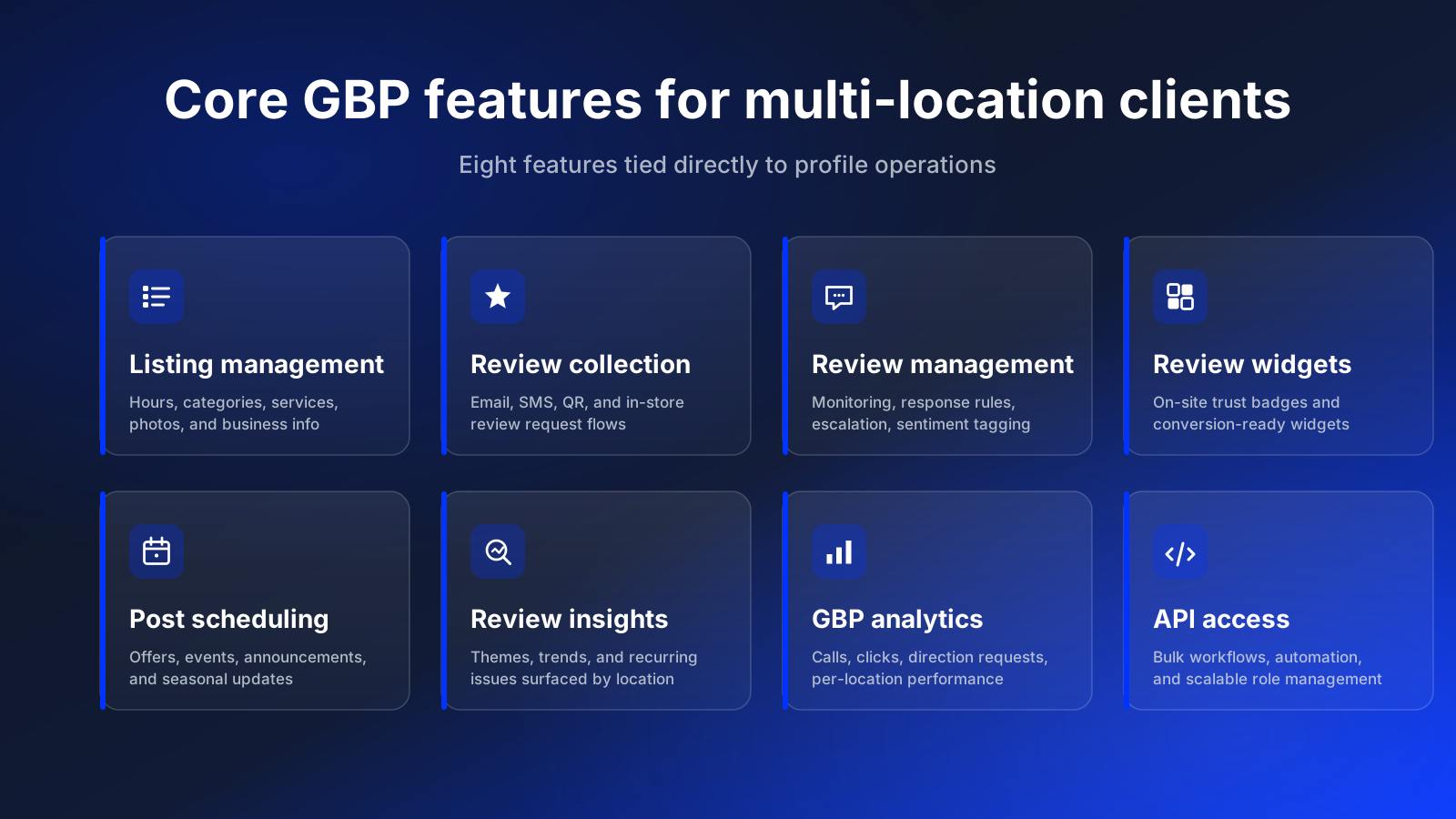
### Core GBP features for large and multi-location clients
If you manage enterprise, franchise, retail, healthcare, or restaurant groups, the most valuable features are usually the ones tied directly to profile operations.
#### GBP business listing management
This covers updating hours, business details, services, categories, menus, photos, and profile fields across locations. For large brands, this is often the operational foundation of the entire engagement.
#### Google reviews collection
Review collection is not just a reputation tactic. It is part of the service when agencies help clients build repeatable flows through email, SMS, QR codes, in-store prompts, or website review requests.
#### Google reviews management
This is where service depth becomes visible. A real review management workflow includes monitoring, response rules, escalation paths, sentiment tagging, and performance oversight. Teams using the [AI Review Reply Agent](/ai-reviews-reply-agent/) can reduce response lag without losing quality control.
#### Google reviews widgets
A strong upsell when clients want to turn profile trust into on-site conversion support. Agencies can package [review widgets](https://embedsocial.com/google-reviews-widget/), badges, and trust elements as part of web or CRO work.
#### GBP post scheduling
Posts are often handled poorly because they are treated as optional. In a stronger service model, they become part of a defined publishing cadence with offers, announcements, seasonal content, and location-specific messaging. That is much easier to execute once teams can [schedule Google Posts](/publishing/) in a centralized workflow.
#### Google reviews insights
Clients do not just want responses sent. They also want to know what review themes are emerging, which locations are improving, and where service issues are likely to create future reputation problems.
#### GBP analytics
Good service reporting should show more than vanity numbers. Location-level [Google Business Profile analytics](/analytics/) help agencies and operators track calls, views, direction requests, review coverage, and location-level trends.
#### Google Business Profile API access
This matters most once the account becomes operationally complex. The [Google Business Profile API](/api/) supports more scalable role management, bulk workflows, review handling, and automation paths than manual one-by-one profile work.
### Bundled GBP workflows for SMEs
Smaller businesses often do not need a large standalone GBP program. For them, GBP management works well as part of a broader marketing bundle.
#### GBP management as part of social media monitoring
If an agency already handles comments, messages, or social reputation workflows, Google review monitoring is a natural extension.
#### GBP publishing as part of social media publishing
Teams already planning Instagram, LinkedIn, or TikTok calendars can extend the same editorial system into Google Posts.
#### Local SEO as part of a broader SEO engagement
This is where profile optimization, reviews, categories, and local intent can complement site-level SEO work. Agencies often win by packaging local SEO and profile operations together instead of treating them as separate silos.
#### Review widgets as part of web design or CRO
When agencies already improve landing pages, a GBP trust layer is a logical add-on.
#### GBP analytics as part of reporting retainers
If the client already receives monthly marketing reporting, GBP performance should be part of that view rather than a separate afterthought.
## Best practices for Google Business Profile management
The teams that manage Google Business Profile work well do not rely on memory. They build recurring workflows.
### 1. Treat GBP management as a recurring operating cadence
The best GBP programs run on weekly and monthly rhythms, not random check-ins. A healthy cadence often looks like this:
- weekly review-response coverage,
- weekly checks for profile edits and suggested changes,
- monthly business-data validation,
- monthly Google Post planning,
- quarterly category and attribute audits,
- quarterly role and permissions review.
This approach matters for agencies and in-house teams alike. When someone asks how to manage Google Business Profile work consistently, the first answer is not "use more features." It is "put the work on a schedule."

### 2. Standardize profile data before you scale
Before you automate anything, standardize:
- naming conventions,
- categories,
- descriptions,
- service lists,
- hours formatting,
- image naming and upload rules.
Standardization prevents the classic multi-location problem where every location describes the same service differently. It also makes bulk edits easier later. If you plan to scale service delivery, the input quality has to come first.

### 3. Set review-response rules and SLAs
Review management is one of the clearest places where service quality becomes visible. Strong teams define:
- which reviews need same-day attention,
- who can respond directly,
- which cases escalate to legal, operations, or customer support,
- how tone and messaging should vary by issue,
- when managers need approval before posting.
For agencies, this is where retainers become sticky. Clients do not just want "review monitoring." They want confidence that the right response goes out at the right time.

### 4. Publish Google Posts on a repeatable schedule
Most teams either over-post for a week and disappear, or they never build a usable cadence. A better model is to create a light monthly calendar around:
- offers,
- events,
- local announcements,
- seasonal updates,
- product or service highlights.
That is especially important for brands managing many locations. Once the content is planned centrally, teams can schedule Google Posts in batches instead of relying on one-by-one updates.

### 5. Use permissions, approvals, and audit trails
A surprising amount of GBP damage comes from unclear ownership rather than bad intent. People edit the wrong location, remove categories, transfer access incorrectly, or respond to sensitive reviews without context. Best practice is simple:
- define who owns strategy,
- define who owns execution,
- define who approves changes,
- keep an audit trail for important edits.
This is one of the clearest differences between casual profile maintenance and real Google Business Profile management.

### 6. Measure outcomes by location, not just globally
One global performance chart rarely tells the truth. A 40-location brand can look healthy in aggregate while ten underperforming locations quietly drag the system down. Good operators review:
- calls and direction requests by location,
- review volume and response coverage by location,
- post output by location,
- ranking and visibility shifts by region,
- profile completeness and data quality by location.
That is why location-level Google Business Profile analytics matter so much for agencies and operators making decisions at scale.

## Real-world examples of GBP management in action
The best way to explain Google Business Profile management is to show how the work looks in practice.
### Agency example: 12-location dental group
An agency wins a multi-location dental client with 12 practices across two states. At first, the client asks for "help with reviews and profile cleanup." Once the engagement starts, the actual scope expands:
- normalize categories across all practices,
- update service descriptions,
- maintain doctor and office photos,
- respond to reviews within 24 hours,
- publish monthly insurance and seasonal updates,
- report on top-performing locations.
The agency quickly learns that the value is not in isolated tasks. It is in running a dependable system. Their best practice is to define a single operating checklist for every location, then create escalation rules for clinical or sensitive review cases.
Read more: GBP management for healthcare →
### Restaurant chain example: weekly offers and review coverage
A restaurant group with 18 locations wants to improve local visibility and consistency. Their issue is not lack of activity. It is uneven execution. Some locations post frequently. Others never do. Some managers answer negative reviews well. Others ignore them. Holiday hours get updated in one city and forgotten in the next.
The service fix is a centralized weekly workflow:
- head office approves campaign themes,
- local teams provide location-specific photos or offers,
- the marketing team publishes updates in batches,
- reviews are triaged daily with clear response rules.
This is a good example of how to manage Google Business Profile activity without making every location invent its own process.
Read more: GBP management for retail →
### Home services example: seasonal updates and service-area control
A home services brand with eight territories has recurring operational changes:
- weather disruptions,
- seasonal service promotions,
- emergency schedule changes,
- service-area expansion.
Their GBP management service focuses on speed and change control. They need hours, service descriptions, and attributes updated quickly, but they also need one person to confirm that those changes are accurate before they go live. Best practice here is not just speed. It is controlled speed.
### Franchise example: regional approvals with central reporting
A franchise brand wants every location to follow brand standards, but local owners still need some flexibility. Their GBP service model separates three roles:
- central brand team,
- regional approvers,
- location operators.
The local operators can suggest changes. Regional managers approve promotional or operational updates. The central team maintains reporting and final policy. This creates local agility without losing brand consistency.
Read more: GBP management for franchises →
## What to include in your GBP management stack
The right service stack depends on complexity. A single-location business may survive with native Google controls and a lightweight checklist. Agencies and multi-location brands usually hit a wall faster.
### Native Google workflows
Native tools are enough when:
- location count is low,
- update volume is low,
- one or two people own the work,
- reporting needs are minimal.
### Centralized operations and bulk workflows
Once locations, stakeholders, or update frequency grow, manual processes get expensive. Teams start needing:
- bulk edits,
- centralized dashboards,
- role-based permissions,
- approval flows,
- change visibility,
- reusable posting workflows.
### Reporting and analytics
A management service is harder to retain if the client cannot see what is happening. Agencies especially need clean reporting to show:
- output completed,
- engagement handled,
- issues resolved,
- location trends,
- visibility or interaction improvements.
### API access and automation
The next layer is automation. This matters when teams need to move faster or reduce repetitive manual work. If your service includes review handling, post scheduling, or recurring updates across many locations, the Google Business Profile API becomes part of the conversation. The point is not automation for its own sake. It is creating a more reliable operating system.
## How Localith helps agencies and multi-location brands
If your team runs Google Business Profile management at scale, you need more than a place to log in and edit profiles one by one. You need a shared environment for delivery.
Localith helps teams:
- centralize listing management across locations,
- coordinate review response workflows,
- publish updates with more consistency,
- monitor location-level performance,
- support agency and client collaboration,
- build API-connected workflows for scale.
For agencies, that means a stronger operational offer and a cleaner way to package Google Business Profile management inside a retainer. For multi-location brands, it means fewer disconnected tasks across regional teams. The combination of listings management, analytics, publishing, and API access gives operators one system instead of scattered manual work across multiple accounts.
If your team is already feeling the cost of spreadsheets, screenshots, and reactive updates, Localith is the bridge between "we manage profiles" and "we run a real GBP management system."
## Conclusion: Build a repeatable GBP management system
Build your Google Business Profile management around recurring workflows, not scattered tasks. Standardize the data layer first, define review and publishing rules early, and give each stakeholder a clear role. Then support that operating system with tools that make bulk updates, reporting, and approvals easier to manage at scale.
Ready to run GBP management as a system instead of a scramble? Explore [Localith for multi-location teams](/listings-management/) or review [pricing](/pricing/) to match the right plan to your client or location count.